OAuth for Portal Users

Most apps that access the Force.com APIs do so on behalf of ‘full’ Salesforce users, gaining access to all of the Contacts, Accounts and other standard and custom objects that the user has access to, but it’s also possible for apps to call the APIs on behalf of Portal users, manipulating the Contacts, Cases etc that the Portal user can access. Until now, the only way for apps to authenticate Portal users has been to use the login() SOAP API call, setting orgId and portalId in the SOAP LoginScopeHeader. With the Spring ’13 release, apps can now use OAuth 2.0 (see also Digging Deeper into OAuth 2.0 on Force.com) to obtain tokens for accessing APIs on Portal users’ behalf. Not only do apps no longer need to handle user credentials, Portal users can now authenticate to the Portal via Auth Providers or SAML as well as username/password. Let’s take a closer look…

The first step in enabling OAuth for your Portal users is to associate a Force.com Site with your Portal, if you have not already done so. The Site provides your Portal with a unique URL and allows you to create a custom login page. Apps that wish to login users for the Portal must use the hostname from the Site’s secure URL when redirecting users to the OAuth 2.0 authorization service. For example, rather than redirecting to

https://login.salesforce.com/services/oauth2/authorize?response_type=code&client_id=<your_client_id>&redirect_uri=<your_redirect_uri>

instead use

https://mysite.secure.force.com/services/oauth2/authorize?response_type=code&client_id=<your_client_id>&redirect_uri=<your_redirect_uri>

The authorization service will recognize the custom hostname and further redirect the user to the Site login page, assuming the user is not yet authenticated.

Here’s a simple Portal login page that allows users to login with username/password or via a Facebook Auth Provider (source code):

Looking at the login page controller, notice that we capture the value of the incoming startURL parameter. Passing that value to the Site.login() Apex call, or as a query parameter to the Facebook Auth Provider, ensures that, once the user is authenticated, they will be redirected back to the app.

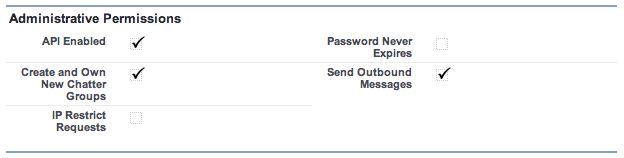
The final piece of the puzzle is that the user must have the ‘API Enabled’ permission on their profile. Since you can’t set this on the default ‘High Volume Customer Portal’ profile, you will need to create a custom profile as a clone of the existing one and check ‘API Enabled’ on that custom profile.
This is all getting a bit abstract; let’s make it real by taking a look at the process in action. Before recording the video, I revoked permissions for my app on my Portal user’s record in Salesforce, and for the Portal on my Facebook account, and logged out from everywhere, so you can see the entire process. Second time round I just logout from my app and the portal. Since I’m still logged in to Facebook, one click at the Portal login page is all it takes to login to the app.

Now it’s easier than ever to write apps for Portal users, I hope this article has sparked an idea for a new app. Let me know in the comments what you’re thinking…

Bookmark the permalink. Trackbacks are closed, but you can post a comment.
  • Chirag Mehta

    Been waiting for this since long, great post Pat. This will guide in developing easy to use(login) apps for portal users too.

  • Alessio Valentini

    Hi.

    This is working perfectly. I have a problem though. When authenticating the page it’s not recognizing the page as an https website.

    “You attempted to reach thepinkhouse.phase2full.cs13.force.com, but instead you actually reached a server identifying itself as *.cs13.force.com. This may be caused by a misconfiguration on the server or by something more serious. An attacker on your network could be trying to get you to visit a fake (and potentially harmful) version of thepinkhouse.phase2full.cs13.force.com.
    You should not proceed, especially if you have never seen this warning before for this site.”

    The problem is that using a normal browser you can click “procede anyway” and it simply put a red cross on the https. When using a mobile app this is breaking the login process because it’s not possible to click “procede anyway” and the user remains stuck in front of a white screen.

    This should be simply recognized as a valide https and work right away.

    Any idea?

  • http://blog.superpat.com/ Pat Patterson

    Alessio – it’s a certificate problem. https://thepinkhouse.phase2full.cs13.force.com/ has a wildcard certificate (issued to *.cs13.force.com), but my Chrome, like your browsers, complains that the cert doesn’t match the domain. Looking at my DE domain, https://authtest-developer-edition.na14.force.com/, its cert is issued to *.na14.force.com but it works fine.

    The problem is related to the fact that you have ‘thepinkhouse.phase2full.’ (two dots) before the cs13, and I just have ‘authtest-developer-edition.’ (one dot). I just checked the Site implementation guide (http://login.salesforce.com/help/doc/en/salesforce_platform_portal_implementation_guide.pdf) and it actually says “Note: If a site within a sandbox (non-production) organization is accessed using HTTPS, a certificate name mismatch warning may appear.” See also http://stackoverflow.com/questions/5295521/problems-with-ssl-and-multi-level-subdomains

    A DE or production Site won’t have this problem.

  • http://twitter.com/hemmeter Scott Hemmeter

    This same concept applies to SSO where you use the My Domain rather than Sites. Brilliant!

  • Thomas Gagne

    Did you skip a step? How did the portal user register, and how does the Facebook login match with a portal user? Does it look at the Facebook email and find the portal user using their email? What happens if two portal users have the same email address?

  • http://blog.superpat.com/ Pat Patterson

    Hi Thomas – I covered some of this in an earlier blog post – apologies for not including a link: http://blogs.developerforce.com/developer-relations/2012/01/social-single-sign-on-authentication-providers-in-spring-12.html

    I’ve also created a step-by-step tutorial for setting up the portal, site, authentication from Facebook – see http://bit.ly/cis-force-2012

  • Sidharth Agarwal

    Hey , can we create a mobile app (ios / android) for PORTAL USERS? May be using Salesforce Mobile SDKs.
    I have been having difficulty on how to do it for PORTAL USERS, any link, guidance will be appreciated.

  • http://blog.superpat.com/ Pat Patterson

    Yes – for portal users you open the app’s Settings page (in the iOS Settings app) and set the custom host to the secure site URL’s hostname – e.g. mysite.secure.force.com – and set Login Host to ‘Custom Host’.

  • http://blog.superpat.com/ Pat Patterson

    Note that if you are doing SSO with another system – e.g. using a Facebook Auth Provider, you will need to whitelist all of the appropriate hosts by adding them to External Hosts in Supporting Files/Cordova.plist . For Facebook, you would add *.facebook.com, *.fbcdn.net, and fbstatic-a.akamaihd.net

  • Sidharth Agarwal

    I am facing the same problem, while creating android mobile app for portal users. Did you find any solution to this?