Connect Milestones PM to Your Existing Objects

Milstonepm_128x128Milestones PM is a new, lightweight project and task management app from Force.com Labs.  It includes a large number of features, but doesn't connect to any CRM or custom objects in your org.  This is by design, and won't change. However, it is extrememly easy for you to make these connections yourself. 

Let's start with the basic object model.  As packaged, the app includes 7 objects, 6 primary objects and 1 snapshot object for use with analytic snapshots.

MilestonesPM-Data-20110218

This deliberately simple model allows the app to be used by the widest variety of user licenses, including Force.com Free licenses.

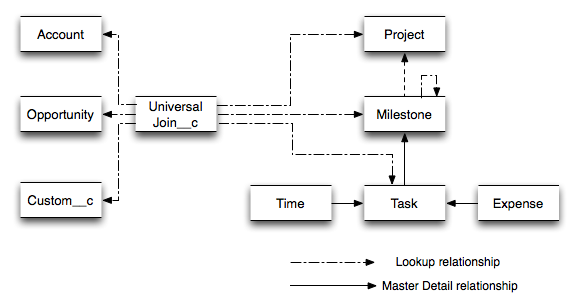
When linking Milestones PM to your existing org, you have a couple of options.  You can either modify Milestone PM objects to include lookups to your existing objects (Account, Opportunity, YourCustomObject__c) or your can create a join object.  I prefer creating a single join object. 
MilestonesPM-UniversalJoin-20110302

 
Note: I've removed the Log and Snapshot objects to simplify the illustration.  You should not remove these from your object model.

I prefer this solution for several reasons.  First and foremost, it gives you flexibility without requiring you to understand, modify or maintain the code in Milestones PM.  You can easily add new objects as needed and, since it's a custom object, you can write triggers or workflow or reports or anything you'd like on it alone.  When updates to Milestones PM come out, you will have a very limited number of potential conflicts to resolve.  This solution also lets you specify many potential relationships or easily limit to a single relationship if that's required.

Your join object custom fields should now look something like this:

Picture 11
Notice that I've added an extra cross-object formula field, Project Status.  I've done this so that I can see the status quickly on the related list, which now looks something like this:

Picture 12

This object can also include references to Time, Expense and Log objects if you wish.

Reporting is also very straightforward.  As long as you "Enable Reports" for your join object you will automatically have report types that help you produce a report.  One potential down side of the many to many nature of this junction strategy is that you cannot create a report type that traverses all three objects.  The easy work around for this is formula fields, as I've already demonstrated above.

Questions?  Comments?  Please feel free to add below or on the developer boards.

Try Milestones PM today.

tagged , , Bookmark the permalink. Trackbacks are closed, but you can post a comment.
  • http://profile.typepad.com/forcedotmom ForceDotMom

    Thanks for the post. I had already set up lookup relationships with other objects, but I like the idea of using a junction. Especially for keeping reports uncluttered. Going to try this out.

  • http://profile.typepad.com/carlberg Reid Carlberg

    Great to hear @ForceDotMom — let me know how it works for you.

  • silvano

    Hi Reid,
    thanks you very much I’m new to force.com and can really look at a real working sample. Your idea is nice! Only problem i see is that cannot show Account in Project columns. I would like the User to enter and filter also for account. What do you think?
    Thanks
    –silvano

  • http://profile.typepad.com/carlberg Reid Carlberg

    Hi Silvano — Thanks for the note! I’m not sure I understand what you are looking for — can you explain in a little more detail? Thanks! Reid

  • silvano

    Hi Reid,
    thanks for your reply. Is there a way to have the Account Name in the Project Columns, using Universal Joins?
    I have also another question thas is more related to licenses. I would like to create an application starting from Milestone PM. I know that if users will use CRM + Milestone the need to pay two liceses the one of CRM and the other for force.com.
    But I would like to create a very light application where users will connect through their iphone and update the work they have done in the tasks. What kind of license those users needs?
    Thanks
    –silvano

  • http://profile.typepad.com/carlberg Reid Carlberg

    Yes, you can show the Account name in the related list — it’s just a matter of adjusting the page layout. You can find more details in Help under page layouts. Re: licensing — if a user has EE/UE, they can use Milestones PM without anything extra. HTH!

  • silvano

    Hi Reid,
    thanks again for your feedback, I can see the Account in the Related List Universal Joins in the Project Layout, but how to create a filter so that i can select only the project of certain Account.
    Another question what’s user has EE/UE??
    Thanks Again
    –silvano

  • http://profile.typepad.com/carlberg Reid Carlberg

    It’s a related list setting. Point and click. If you haven’t yet, I’d recommend getting a free Developer Edition over at http://developer.force.com and installing the app. You can then also post questions to the developer boards, access the GREAT workbook (http://developer.force.com/workbook) and a whole lot more.

  • http://www.improviet360.com Jeff Clark

    We are just finishing up integrating Milestones PM into our app. It comes with some nice features, plus we’ve added some addition items per our requirements.
    I like the idea of exporting and importing project XML files. We took this idea and extended it a little more to Use them as project templates and to re-calculate milestone Kickoff and deadlines from the project start date.
    @silvano: Milestone PM is free, your users don’t pay a license fee.

  • http://profile.typepad.com/carlberg Reid Carlberg

    Jeff — That sounds really cool. Love to see it in action some time. Please ping me at labs at salesforce dot com when you’d like to show it off.

  • Peter Seaman

    HI Reid
    Your app is amazing
    on Milestone1_Milestone_Values_Helper
    line 42 maybe should be newRecord.Complete_Tasks_in_Sub_Milestones__c += child.Total_Complete_Tasks__c;
    instead of closed tasks
    Thanks so much for your time
    Regards
    Peter

  • http://profile.typepad.com/carlberg Reid Carlberg

    Peter, you totally just made my day. Maybe my week. Awesome. Thanks!
    http://blog.sforce.com/sforce/2011/03/milestones-pm-the-power-of-open-source.html

  • http://www.parx.de Jochen Schrader

    Hi Reid,
    thanks for this great idea to connect the salesforce standard objects.
    Just one comment on the data model illustration: I think, the arrows between the junction object and the Milestone PM Objects should go in the other direction.
    Thanks for this app!
    Jochen

  • http://profile.typepad.com/carlberg Reid Carlberg

    Hi Jochen — Good catch! I agree and have updated the illustration. Thank you for pointing that out and I’m glad that you find Milestones useful.

  • silvano

    @Jeff
    Thanks Jeff for you reply. I have few questions. I’m extending Milestone PM, but i have a free developer license, now the platform is blocking me because i created more than 10 objects and 25 custom tabs. So now i will get the Enterprise Edition. The question are:
    1) How my users will install the new application can i create a new application starting from Mileston PM?
    2) Do my users need to pay to use the application if is a total force.com without accessing Sales Force CRM?
    Thanks
    –silvano

  • http://www.itedgecrm.com Frank Cabreja

    Silvano, you could have customers look at a tab for the Junction Object to be able to sort your projects by accounts. Alternatively, you would have to create a custom field on the Project object for Account name. You could then have a trigger on the junction object, that writes the account name of the last saved juncion object for that Project to the Account Name field. Just some thoughts for you…

  • Gianni Melillo

    Although Milestones PM is selected and Chatter Plus users can select the
    app in the dropdown, the app’s tabs do not appear in spite of being set
    to visible in the profile. The profile also includes permissions to
    read/edit the app’s custom objects but to no avail. Appex permissions
    are also set.
    Furthermore, when the user tries to open the calendar tab, the following
    error is displayed on the page (but the calendar isn’t displayed):
    No such column ‘Id’ on entity ‘Milestone1_Project__c’. If you are
    attempting to use a custom field, be sure to append the ‘__c’ after the
    custom field name. Please reference your WSDL or the describe call for
    the appropriate names. In this instance, it is not visible to the user
    because the custom object has not yet been deployed .
    Any idea /help on this pls ?

  • http://profile.typepad.com/carlberg Reid Carlberg

    @Gianni — you need to deploy your objects. The easiest way is to deploy the whole app. Setup > Customize > View Installed Packages. Click on “Milestones PM”. Click the Deploy button. Click the next deploy button. Should be good to go. HTH. BTW you can also asked questions over on Salesforce Answers — http://labs.force.com/ask.
    Cheers

  • https://na5.salesforce.com/home/home.jsp Nancy Franklin

    This is clearly the best app to install for the Project Management functionality that we need. Problem is, we are not using Chatter. I work for a large company that will make that decision across many Salesforce.com instances, so I don’t know when or if we will deploy Chatter. Is this able to be installed without Chatter? When I tried to install this in my Sandbox, I received an installation error because we don’t have Chatter enabled.

  • http://profile.typepad.com/carlberg Reid Carlberg

    The app currently requires Chatter, but you can easily remove the Chatter code — it will require custom development on your part.

  • http://www.motorola.com Jeremy Fernandez

    Is Project Portfolio Management a similar application with added functionality?

  • http://www.blackirongroup.com Dan Corbett

    Hi Guys – I’m trying to use the Import function – I exported a project in XML, but cant get it to open in Microsoft Project – I figured I had to do that in order to change and re-import, but I cant even get the export to work. I’m on Microsoft Project 2007 – am I misunderstanding the functionality?

  • http://profile.typepad.com/carlberg Reid Carlberg

    Hi Dan — the Export / Import is Milestones PM specific — it isn’t something that converts back and forth with other PM systems like MP.

  • http://profile.typepad.com/carlberg Reid Carlberg

    @Jeremy — this is actually a brand new app, written from scratch, different than PPM.

  • Ed

    Reid,
    This is a fantastic app. I’ve tried it in my developer org and it works perfectly.
    The only issue I have is the whole dependency on Chatter. I know you said that it can be configured, but with my limited Salesforce Coding knowledge, I don’t want to start fiddling with the code and corrupting the package.
    Like some, our org doesn’t and won’t have chatter enabled, so this is going to be a problem for us.
    Do you have any advice on how we can get around this?

  • http://profile.typepad.com/carlberg Reid Carlberg

    Thanks Ed glad you like it.
    Right now removing the Chatter dependency is a code activity — it’s centralized to one place, so if you want to remove it your coders just need to search out the chatter objects and remove them.
    The code is in this class — https://github.com/ForceDotComLabs/Milestones-PM/blob/master/src/classes/Milestone1_Task_Trigger_Utility.cls and then there are a couple of tests to clean up as well.

  • Depton

    I have the a wrong date in the calendar
    Today is Wednesday 8, June and in the Milestone Calendar said that is Tuesday.
    Do you know how to fix this?
    Thank you

  • http://profile.typepad.com/carlberg Reid Carlberg

    Weird. Do you mean the project calendar? Mine shows correct. I wonder if there’s something stale / cached in the data. Can you try closing your browser and re-opening? Does that have any affect?

  • Depton

    Thank you for getting back to me!
    I mean, when i go to the calendar tab (from the Milestone PM app), I have “this week view” and i see:
    June 2011
    Sunday 6
    Monday 7
    Tuesday 8
    and today is Wednesday!
    I am checking the code but still haven´t found anything, I Have installed Milestones the first week of May!!

  • http://profile.typepad.com/carlberg Reid Carlberg

    Huh. That’s confusing. I have a sample install that is right. What is your timezone set to?

  • Depton

    I have checked that already!
    I have Paris, but also checked NY,Samoa anf Philippines and still the same!
    I have no idea why! I might install the latest milestones version in my sandbox or any dev org and let you know!!
    thanks!!

  • Depton

    I have checked the default time zone for the org also and is GMT + 1, so I don´t think the issue is related to this.
    My first day of the week in the calendar is Sunday?? is that the expected behaviour.
    Also the class I guess I have to check is: Milestone1_repeatCon
    Am I right?
    Thank you!

  • http://www.cleartask.com Jonathan

    I’m just starting to look at this app. Is there a standard way to assign resources (Users) to a project? I’d like to be able to track availability and assign future projects.

  • http://profile.typepad.com/carlberg Reid Carlberg

    @Jonathan — that’s not part of the feature set yet. We are looking for help developing it — full code access is at http://github.com/ForceDotComLabs/Milestones-PM
    @Depton — you’re looking in the right place — let me know what you find!

  • Dominic Heah

    Thanks for the app Reid. Just a quick question, if I add Custom Fields to the Project Object (to extend its functionality), will it have any impact on future updates to the app? I’m new to installing apps in Salesforce and am just not sure how do updates get reflected (if any) and if there is any impact on the original app if I start to customise the app by adding other custom fields.

  • Depton

    Cannot find where the issue is :(
    My calendar Week days starts ith Sunday, is this the way it should be?
    Thank you

  • http://profile.typepad.com/carlberg Reid Carlberg

    @Dominic. you’re welcome! You are free to modify the objects. however, if you push an update over your installed app, you will overwrite your customizations. this means you will end up making changes to the core object every time you want to update. another approach is to create a related object that looks up to project, and store your customizations there. You can then push new versions out without worrying about overwriting your object level customization (except perhaps the occasional page layout issue).

  • Depton

    I have found the issue of the calendar:
    Visualforce Component: MIlestone1_Calendar_Full
    Here you have manually added the days of the week, starting on Sunday, I just have changed it starting on Monday and works fine.
    However must be a way to look for a “firstdayoftheweek” or “weekdays” so we do not have to do it manually but with code taking the info from salesforce (like you can do it in windows :) :)

  • http://profile.typepad.com/carlberg Reid Carlberg

    Hi Depton, Hey that’s great news!
    What do you think about adding a field to the custom setting, and using that in the calendar instead of the code? Seems like that should work.
    Is that a change you can do and submit via Github so I can include it?

  • Depton

    Hi Reid,
    I will look for the best way to do it and let you know!!….I have one more question:
    regardless I have completed tasks and input expenses and hours,etc…I do not have information in the project sections named:
    Metrics: Milestone Information (Calculated)
    Metrics: Hours & Expenses (Calculated)
    Is there any trigger updating the fields include in that section?
    Because these fiels are number only (are not summary fields or even formula)
    Maybe i have delete a trigger that was updating these sections, if not I will have to create this fields again!!!!
    Thank U!

  • http://profile.typepad.com/carlberg Reid Carlberg

    Yes, all of that is trigger driven and should be there.

  • http://www.facebook.com/eikanger Christopher Eikanger Andersen

    Hello,

    Thanks for this article. I was wondering if it is possible to sync the built in calendar in the Milestones PM with the standard Salesforce calendar?

  • http://twitter.com/ReidCarlberg Reid Carlberg

    It’s not included as part of the base package but it should be possible with a trigger.

  • http://twitter.com/techbusinessman Tyler Mowbrey

    Can this still be done with the new managed app?

  • Kay Ann

    Hi Jeff and Reid, I just installed the Milestone PM app in my dev org to try out. I have to handle projects with over 10 milestones and 80 tasks, so I am trying to find a way to easily clone project template (milestones + tasks) and I saw the import export project XML files in this app. However, I can only export, but cannot find a way to import. I checked the page layout and didn’t see the Import Template button. Can you provide some instructions on how to import an XML file please? Thanks.

  • Kay Ann

    Sorry for the silly question. I found the Import Template tab. This is very handy. Just wish the steps in the sample project could have included some more detailed instructions.

  • Jschwartz

    I’m completely new to a lot of this, but are there any good detailed instructions on how to create this join object? I’m trying to link contacts and accounts to projects? thanks

  • Lisab

    HI,

    How can we get the tasks from PM Milestones to show up on a user<s homepage? Also how can the assigned users be notified of a new taks in a milestone from the app?
    Thanks Kindly

  • http://twitter.com/ReidCarlberg Reid Carlberg

    You could create a custom home page component with VF and show it. Likewise, there’s a link to “My Tasks” on the Summary page. You could use that report as a link on the home page.

  • Brandon R

    Is there an easy way to mass update dates for multiple task or an entire milestone?

  • Ryanhardy057

    Flexibility is my favorite task management tools feature. And this tool is characterized by seamless work and clear interface. In my projects we use comindware software, but I hear the first time about Milestones PM. BTW, to have an efficient PM tool is important to create a correct collaboration process.

  • Chris

    Quick comment, looking at snapshots and can’t seem to get them running, must be something simple I’m missing

  • http://twitter.com/passagetech Passage Technology

    If you want to email support@passagetech.com, we’ll be happy to take a look at it for you.

  • http://twitter.com/passagetech Passage Technology

    Not in Milestones PM yet, but there is a way to do with some development. We’ve created an app based on Milestones PM that will have this feature. It is on our roadmap. Coming soon!

  • http://twitter.com/passagetech Passage Technology

    Yes

  • http://twitter.com/passagetech Passage Technology

    Not in Milestones PM yet, but I believe there is source code on GitHub for this. If your technically savvy enough, you may be able to integrate it now. Let me know if you need a link to this.

    My company is planning on integrating the salesforce.com calendar with an application/managed package that is based on Milestone PM. Out of curiousity, how exactly would you want it to sync? Would you want all tasks created in Milestones PM to be automatically synced as events on your calendar, or would you want to select which tasks to sync with events?

  • http://twitter.com/passagetech Passage Technology

    Hi Jonathan, great idea! We’ve incorporated this in a new application based on Milestones PM. Check it out. http://gurl.im/39473mB

  • Gary McGeorge

    Hi is it possible to attach the link to the sourceode on github please as I’d like to be able to synchronise also.

  • Reid Carlberg