 Over in the world of Force.com Labs, our apps have a long history of being open source. We've recently been moving a select number of these to GitHub as it offers some great social coding capabilities. This article will describe a simple workflow for working with these native Force.com apps, GitHub, Git and the Force.com IDE.
Note: Pat Patterson has a great blog up about Force.com Toolkits on Github as well. Worth a read.
The first thing you need to do is get setup with GitHub. It's ridiculously easy. If you've used classic source code management (SCM) apps like CVS, SVN or Perforce, you'll find that Github is a lot easier. There are step by step instructions for the Windows and Mac afficiandos among you and I can verify they are both dead easy to get started with.
Full disclosure: I was a complete newbie on Git not too long ago. There are a lot of possible commands, but the basics I walk you through here really are easy to remember.
For our example today, we'll be using the Milestones PM lightweight project and task management app. Before getting started, you should have four things: a clean developer edition account, the security token for your DE org user, GitHub up and running and the Force.com IDE (or Eclipse plug-in) up and running.
1. Fork the Milestones-PM app from the ForceDotComLabs account. It's pretty easy. Navigate to the project's page on GitHub and click on the "Fork" button. You will then see a temporary screen noting that "Hardcore Forking Action" is occuring. Don't worry. This is normal.

2. Open up a console and navigate to your Force.com IDE / Eclipse working directory. Enter the Git command "git clone git@github.com:YourUserName/Milestones-PM.git". This will get all the code from Git into your Eclipse working directory.
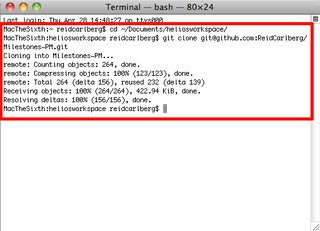
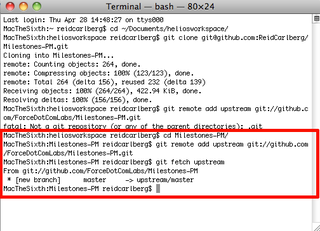
3. Still in the console, make sure you have added the upstream origin to your local Git repository. This makes it dead easy to update your local repo to the latest code from the master. First, cd into the Milestones-PM directory that was automatically created in the last clone operation. Next, enter the command "git remote add upstream git://github.com/ForceDotComLabs/Milestones-PM.git" and then "git fetch upstream". (Note: if, as in the screenshot, you attempt to add the upstream directory before changing into the directory, as I often do, you will get the same error you see just above the red line.)
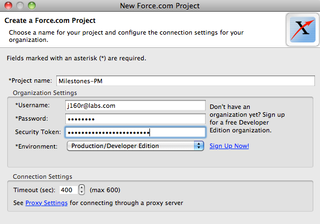
4. You are now ready to go into the Force.com IDE. Create a new Force.com project. Important: use the exact same project name as you're using in the GitHub repo — Milestones-PM in this case. (Note the hyphen.)
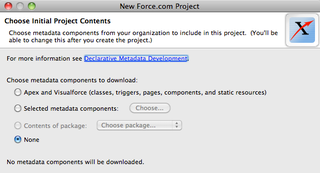
5. When the system prompts you for which metadata components you want to install, select the none option.
6. And voila — you will now have a local Force.com project that you just cloned from GitHub. You must now use the Force.com IDE to push it to your developer org. Navigate to the "src" folder, right click on it, select Force.com, Save to Server. And just wait a minute while it processes the save. Since you are using a clean DE org, this should work without issue. However, if you are not using a clean DE or you run into errors, you will need to clear those before continuing.
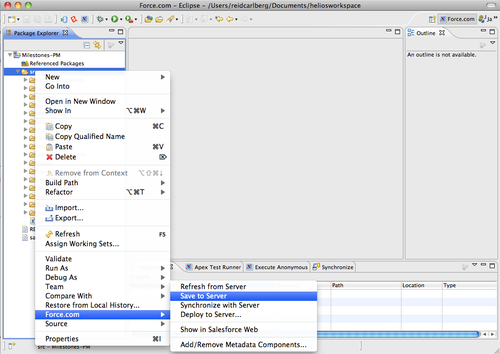
7. You can now work in the Force.com IDE to your heart's content. Be awesome.
8. When you are ready, you can now commit your changes back to your forked GitHub Milestones-PM repo. In order to push your changes, you will need to first add them. You can either add them one at a time or use a brute force method that captures them all, even new files. Be sure you are in the project directory (the same place you were at the end of step 3) for either. The brute force method is "git add ./src". You will see a list of everything you changed added, including some files that you may not have consciously changed. For example, the analytic snapshot will have a new running user. This is perfectly fine. Next, you want to commit those changes and add a comment about what you changed. Enter "git commit -m 'a description of your awesome changes and what makes them awesome'". Finally, you are ready to push your changes. Enter "git push".
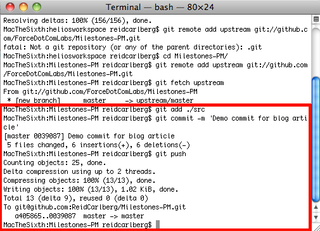
9. Congratulations, you are now ready to send a pull request. A pull request tells the account you forked from that you have changes they should pull. In this case, it tells me that you've created something you'd like me to include in Milestones PM. In your browser, within your forked Milestones-PM repo, click the Pull Request button and submit the pull request form describing your changes.
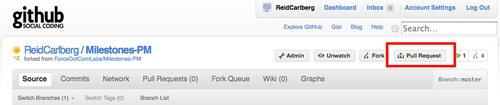

That's it!
There are several Force.com Labs apps on GitHub and more on the way. Milestones-PM, of course, also Brackets (our tournament prediction app) and LeadScoring. All three of these apps are licensed under the BSD license, and so are easy for you to use in your projects.